THE CONNECTED WORKSPACE FOR CONSTRUCTION
Your whole operation.
One connected platform.
Construn connects the people, purchasing, production and financial work behind construction projects. Manage the working day, track material movement and review the business position, with organization, workflow and technical review in the same platform.
Explore it with your team ↗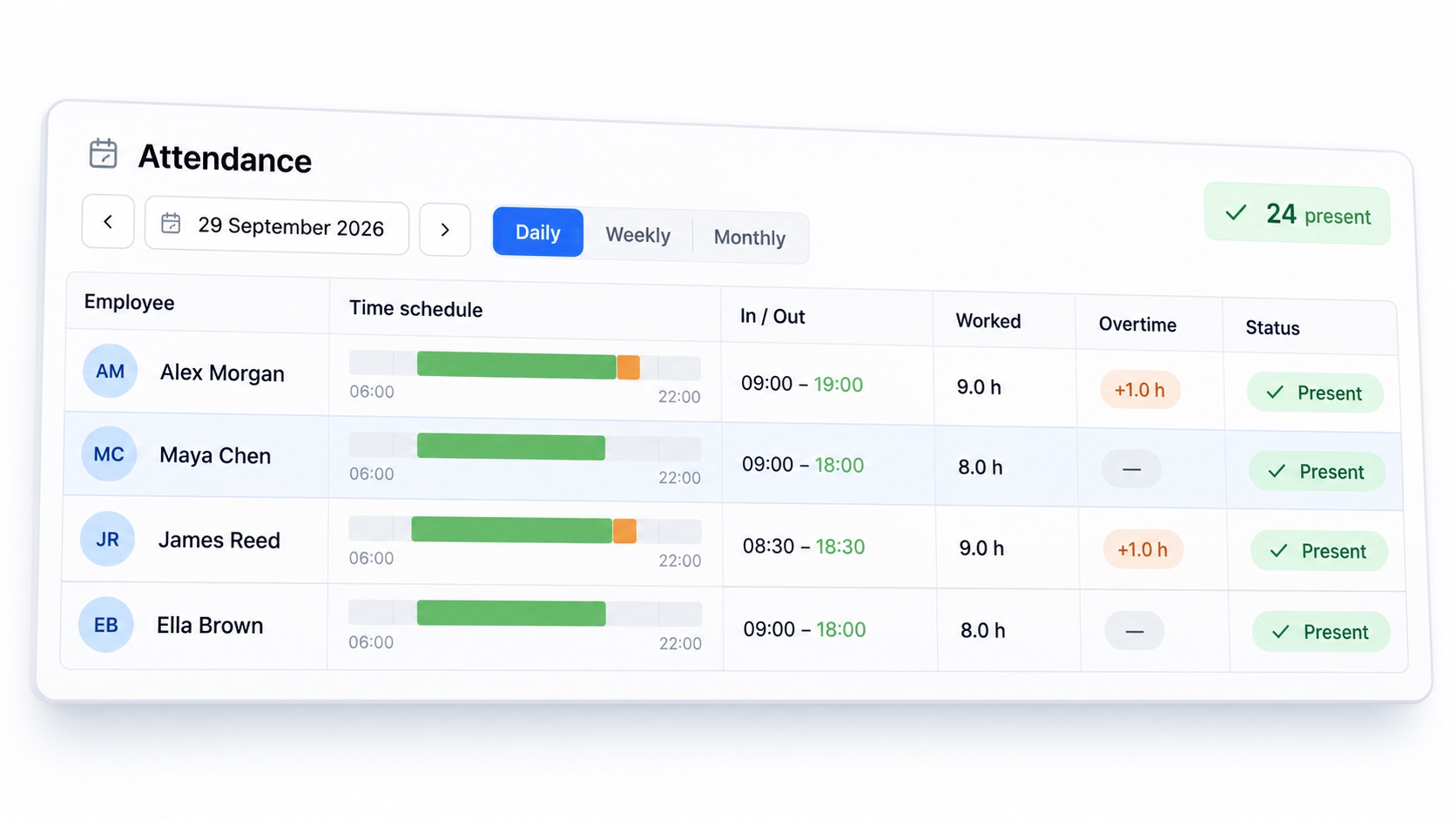
01
Construction ERP with project context
A project needs more than a task list. It also needs responsibilities, specifications, purchasing records, people and a financial picture. Construn brings these areas into one operation, with users and roles governing access to pages and actions. The module index below describes what each area does.
02
The people behind every project.
Who is working, where they are assigned, what they have worked and what needs paying. Bring the daily reality of your team into the same operation as the project. Personnel management: Keep employee records, documents, professional groups, organizational assignments and salary history together. Attendance & timesheets: Review check-in and check-out times, working hours, overtime and absences in daily, weekly and monthly views. Salaries & payroll: Review monthly earnings alongside working time, advances and expenses. Import payroll files, check employee matches and follow payment approval. Daily reports: Record project activity by day and location, with report templates, teams, equipment, notes and weather context. Return to the history when you need the detail. Expenses & advances: Keep amounts, receipts, payment methods and project assignments with each expense. Follow advances, bonuses, approval stages and payment status.
03
From the specification. To the right place.
A material has a life beyond the catalog. It is requested, quoted, ordered, transported, received, held in stock and used in production. Follow those stages with the records behind them. Material catalog: Build shared definitions, variants, units and technical attributes, so the team can identify the material it is actually buying and using. Orders & procurement: Follow requests, approvals, supplier quotations, comparisons, purchase orders and goods receipt, with delivery and purchasing documents. Freight management: Plan shipment records and stops. Keep vehicle, distance, tonnage, organization and cost details with the delivery; follow completion and its financial record. Warehouse & stock: See current, available and ordered quantities by location. Follow incoming and outgoing movements, transfers, low stock and FIFO stock value. Assets & equipment: Track tools, equipment and vehicles with serial or asset numbers, employee assignments, returns and maintenance, inspection and insurance information. Workshop management: Connect product recipes, production records, dispatches, raw material stock and staff hours. Review material, labor, freight and overhead costs by period.
04
Know the cost. See the bigger picture.
Before a bid is sent, and after the work begins. Keep the estimate, actual transactions, financial position and forward plan in view, with the project context behind the numbers. Income & expense management: Follow project income, company expenses, approval status and payment plans. Open related purchasing, freight, personnel and account records where linked. Balance sheet & accounts: Review assets, liabilities and net position. Manage bank accounts, deposits, checks, credit and other account records with their balances and maturities. Budget planning: Plan income and expenses by month. Review dated items, the cash calendar and charts that distinguish recorded figures from future projections. Unit price tracking: Look back at material purchasing prices, suppliers, quantities and dates. Keep original currency, exchange-rate and tax context available for comparison. Bid preparation: Build itemized bids with supplier prices and reusable labor, transportation and overhead templates. Calculate costs, review the summary, export a proposal PDF and follow bid status.
05
Give each person the right access.
A connected operation still needs clear boundaries. Decide who can see each area, who can take an action and who can review sensitive figures. Keep the system aligned with your company. Users & roles: Manage user accounts, role assignments, active status and password resets. Configure page and action permissions, including access to salary and financial information. Organization & branding: Map companies, departments and projects. Apply your company logo, primary color, interface language and PDF letterhead. Working-time rules: Configure attendance calculation settings for the way your team works, with the existing management PIN protection. Audit & recovery: Review recorded changes and administrative activity. Use the backup and recovery tools configured for your installation.
06
Start with your own company
An invitation creates an isolated demo account. Set up your account and company, choose a primary color and upload your logo. Business data starts empty. Load sample records explicitly inside the app if you want to explore an example operation before entering your own work.
07
Choose the workflow you want to explore
Start with the area that causes the most friction for your team: assigning work, coordinating a drawing detail, specifying a material, following a delivery or reviewing costs. The contact form connects you directly with the Construn administrator so a demonstration can focus on your actual requirements.
People
Keep the team and the working day in sync.
- Personnel overview
- See staffing, working time and overtime by company, department and project.
- Employees
- Keep personnel records, salary history and attendance in one place.
- Leaves & reports
- Follow leave and absence records alongside the working calendar.
- Attendance & timesheets
- Follow check-in/out, worked hours, overtime and absences across daily, weekly and monthly views.
- Payroll import
- Bring payroll files in, match records and review the imported data.
- Expenses & salaries
- Track receipts, advances, bonuses, monthly earnings and payment approvals.
Supply & make
Connect what you specify to what arrives on site.
- Material catalog
- Organize definitions, variants and technical attributes.
- Procurement
- Take requests through approval, quotations, orders and goods receipt.
- Procurement tracking
- Follow the progress of purchasing and deliveries.
- Suppliers
- Keep supplier details and related purchasing records together.
- Freight
- Follow shipment stops, vehicle, distance, tonnage, completion and linked financial records.
- Warehouse & stock
- Review current and available quantities, movements, transfers, low stock and FIFO value.
- Assets
- Track equipment and vehicles, employee assignments and returns, maintenance, inspections and insurance.
- Workshop
- Connect recipes, production, raw materials, shipments and costs.
Estimate & control
See the cost before making the commitment.
- Bids
- Prepare itemized bids with supplier prices, calculated costs and proposal PDFs; follow submission outcomes.
- Overhead, labor & transport
- Use reusable cost templates in your estimates.
- Financial overview
- Review assets, liabilities and the financial position.
- Income & expenses
- Follow transactions, approvals and their project connections.
- Balance sheet
- Manage bank, credit, check and other account records.
- Budget planning
- Plan monthly income and expenses with dated items, cash calendars and recorded/projected charts.
- Unit price history
- Follow purchasing prices and exchange-rate context.
- Secret vault
- Keep restricted financial records behind an additional PIN.
Coordinate
From responsibility to a finished task.
- Organization
- Map companies, departments, projects and professional groups.
- Workflow
- Boards, lists, timelines, task owners, checklists and attachments.
- Daily reports
- Record project activity by day and location, with templates, staff, equipment, notes and weather.
Draw & review
Put the conversation exactly where it belongs.
- Pafta · 2D
- Open converted CAD drawings, inspect details and follow revisions.
- Pafta · 3D
- Review supported models in the browser, with object-level context.
- Pins & collaboration
- Anchor workflow items to drawings and models; coordinate around the detail.
- Revision review
- Compare versions and review conversion warnings before publishing.
Ask Brain
Bring a question to the work already in the system.
- Brain
- Explore permitted business data through a connected assistant.
- AI settings
- Configure your provider for AI features; availability depends on your setup.
- Mobile & integrations
- Connect field workflows through the mobile app and configured services.
Make it yours
Your company. Your identity. Your control.
- Users & roles
- Define who can access pages and perform actions.
- Brand & appearance
- Apply your logo, primary color, language and letterhead.
- Attendance settings
- Configure the working-time calculation rules.
- Audit logs
- Review recorded changes and administrative activity.
- Backup management
- Access the configured backup and recovery tools.
- Optional demo data
- Start empty; load sample workflows when you choose to explore.
Your next project.
A better connection.
Tell us what your team needs to bring together.
Request a demonstration ↗Product information reviewed 7 October 2026. Product illustrations use simplified interface details and English sample records. Features and integrations depend on the installation and permissions.